8. Simplifying code with PyTorch-Lightning
Contents

8. Simplifying code with PyTorch-Lightning
We have seen in the previous chapter how to train a neural network. Our training loop contained a lot of “boiler-plate” code, i.e. trivial things that we always need, like loss.backwards(), and that we would like to spare us to write. Several libraries offer such possibilities, the most popular one being PyTorch Lightning. We will here briefly rewrite our code of the Training notebook with this. You will see that we write essentially the same code, save for some boiler-plate.
Another advantage is that the higher-level format offered by Lightning allows us later to simplify complex tasks, like traininig on multiple GPUs.
# set path containing data folder or use default for Colab (/gdrive/My Drive)
local_folder = "../"
import urllib.request
urllib.request.urlretrieve('https://raw.githubusercontent.com/guiwitz/DLImaging/master/utils/check_colab.py', 'check_colab.py')
from check_colab import set_datapath
colab, datapath = set_datapath(local_folder)
Dataloader
We recreate first some previous elements. First our dataset and dataloader:
import torch
from torch.utils.data import Dataset, DataLoader, random_split
import torch
from torch import nn
from torch.functional import F

import pytorch_lightning as pl

import numpy as np
import matplotlib.pyplot as plt
images = np.load(datapath.joinpath('data/triangle_circle.npy'))
labels = np.load(datapath.joinpath('data/triangle_circle_label.npy'))
class Tricircle(Dataset):
    def __init__(self, data, labels, transform=None):
        super(Tricircle, self).__init__()
        self.data = data
        self.labels = labels

    def __getitem__(self, index):

        x = self.data[index]
        x = torch.tensor(x/255, dtype=torch.float32)
        y = torch.tensor(self.labels[index])
        #y = torch.randint(0,2,(1,))[0]#create random labels as "bad" examples

        return x, y

    def __len__(self):

        return len(labels)
tridata = Tricircle(images, labels)
test_size = int(0.8 * len(tridata))
valid_size = len(tridata)-test_size

train_data, valid_data = random_split(tridata, [test_size, valid_size])
train_loader = DataLoader(train_data, batch_size=10)
validation_loader = DataLoader(valid_data, batch_size=10)
Lightning module
Before, we only created an object containing our model and all the remaining tasks - setting up the optimizer, training and validation loop etc. - was done after that “manually”. Here, all this additional work is included in our object in specific methods (training_step, validation_step, configure_optimizers) sparing us a lot of code later on. For example we won’t have to explicitly write epochs and batch loops, take care of calculating gradients, setting them to zeros etc.
You should understand one important feature of Ligthning: the forward function is used for inference (prediction) while the training_step is used for training. Of course one can include the steps of forward in the training loop but the latter can contain much more information.
The actual difference in code is very small compared to classic PyTorch but brings massive advantages. Of importance in my personal opinion: Lightning organizes code and doesn’t abstract away complexity. This makes it easy to still do very fine adjustments to the underlying PyTorch code what other higher-level frameworks make difficult.
This was our previous code defining our model:
class Mynetwork(nn.Module):
    def __init__(self, input_size, num_categories):
        super(Mynetwork, self).__init__()

        # define e.g. layers here e.g.
        self.layer1 = nn.Linear(input_size, 100)
        self.layer2 = nn.Linear(100, num_categories)

    def forward(self, x):

        # flatten the input
        x = x.flatten(start_dim=1)
        # define the sequence of operations in the network including e.g. activations
        x = F.relu(self.layer1(x))
        x = self.layer2(x)

        return x
Now we add methods for training, validation and optimizer which are basically copied from our previous work. Note however that we can skip many things, like loops or backward() calls. The only thing that we are adding are calls to self.log which allows us to capture and display loss, accuracy etc. information during training.
class Mynetwork(pl.LightningModule):
    def __init__(self, input_size, num_categories):
        super(Mynetwork, self).__init__()

        # define e.g. layers here e.g.
        self.layer1 = nn.Linear(input_size, 100)
        self.layer2 = nn.Linear(100, num_categories)
        self.loss = nn.CrossEntropyLoss()

    def forward(self, x):

        # flatten the input
        x = x.flatten(start_dim=1)
        # define the sequence of operations in the network including e.g. activations
        x = F.relu(self.layer1(x))
        x = self.layer2(x)

        return x

    def training_step(self, batch, batch_idx):

        x, y = batch
        output = self(x)
        loss = self.loss(output, y)

        self.log('loss', loss, on_epoch=True, prog_bar=True, logger=True)

        return loss

    def validation_step(self, batch, batch_idx):

        x, y = batch
        output = self(x)
        accuracy = (torch.argmax(output,dim=1) == y).sum()/len(y)

        self.log('accuracy', accuracy, on_epoch=True, prog_bar=True, logger=True)

        return accuracy

    def configure_optimizers(self):
        return torch.optim.Adam(self.parameters(), lr=1e-3)
Now we instantiate the Lightning module:
model = Mynetwork(32*32, 2)
Training
Instead of writing a training loop for epochs and batches, we use the Lightning Trainer object which takes care of everything for us. We first instantiate it and then pass our model and data loaders for fitting (similarly to scikit-learn methods). When creating the Trainer object, we can pass a large number of parameters, the most common being the number of epochs or the usage of GPU:
trainer = pl.Trainer(max_epochs=1)
GPU available: False, used: False
TPU available: False, using: 0 TPU cores
IPU available: False, using: 0 IPUs
trainer.fit(model, train_dataloaders=train_loader, val_dataloaders=validation_loader)
  | Name   | Type             | Params
--------------------------------------------
0 | layer1 | Linear           | 102 K
1 | layer2 | Linear           | 202
2 | loss   | CrossEntropyLoss | 0
--------------------------------------------
102 K     Trainable params
0         Non-trainable params
102 K     Total params
0.411     Total estimated model params size (MB)
/Users/gw18g940/miniconda3/envs/CASImaging/lib/python3.9/site-packages/pytorch_lightning/trainer/data_loading.py:132: UserWarning: The dataloader, val_dataloader 0, does not have many workers which may be a bottleneck. Consider increasing the value of the `num_workers` argument` (try 4 which is the number of cpus on this machine) in the `DataLoader` init to improve performance.
  rank_zero_warn(
/Users/gw18g940/miniconda3/envs/CASImaging/lib/python3.9/site-packages/pytorch_lightning/trainer/data_loading.py:132: UserWarning: The dataloader, train_dataloader, does not have many workers which may be a bottleneck. Consider increasing the value of the `num_workers` argument` (try 4 which is the number of cpus on this machine) in the `DataLoader` init to improve performance.
  rank_zero_warn(
Epoch 0: 100%|██████████| 5000/5000 [00:54<00:00, 91.54it/s, loss=0.00865, v_num=6, loss_step=0.0378, accuracy=0.998, loss_epoch=0.0292]
Inference
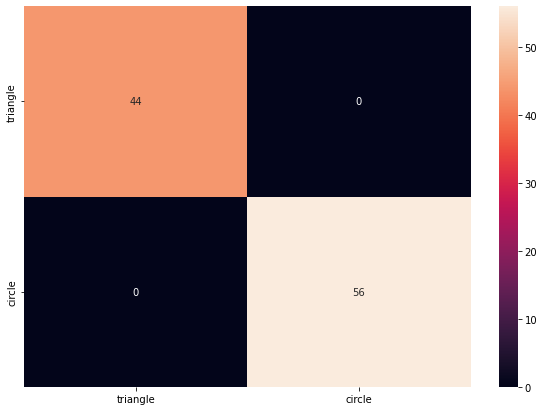
To check that trainig worked, we just generate again some images:
urllib.request.urlretrieve('https://raw.githubusercontent.com/guiwitz/DLImaging/master/notebooks/dlcourse.py', 'dlcourse.py')
from dlcourse import make_image
im_type = ['triangle', 'circle']
label = torch.tensor(np.random.randint(0,2,100))
mybatch = torch.stack([make_image(im_type[x]) for x in label])
mybatch.size()
torch.Size([100, 32, 32])
pred = model(mybatch)
pred.argmax(dim=1)
tensor([0, 0, 1, 0, 0, 0, 0, 1, 1, 0, 1, 1, 0, 1, 1, 1, 0, 0, 0, 1, 1, 1, 0, 0,
        1, 0, 1, 1, 1, 0, 0, 0, 0, 1, 1, 1, 0, 0, 1, 1, 0, 0, 1, 1, 1, 0, 0, 1,
        1, 1, 1, 1, 1, 1, 1, 0, 1, 0, 0, 1, 1, 0, 0, 1, 1, 0, 1, 0, 1, 0, 1, 1,
        1, 1, 1, 0, 0, 0, 0, 1, 1, 1, 0, 1, 0, 0, 1, 1, 1, 1, 1, 0, 1, 1, 0, 0,
        0, 1, 1, 0])
label
tensor([0, 0, 1, 0, 0, 0, 0, 1, 1, 0, 1, 1, 0, 1, 1, 1, 0, 0, 0, 1, 1, 1, 0, 0,
        1, 0, 1, 1, 1, 0, 0, 0, 0, 1, 1, 1, 0, 0, 1, 1, 0, 0, 1, 1, 1, 0, 0, 1,
        1, 1, 1, 1, 1, 1, 1, 0, 1, 0, 0, 1, 1, 0, 0, 1, 1, 0, 1, 0, 1, 0, 1, 1,
        1, 1, 1, 0, 0, 0, 0, 1, 1, 1, 0, 1, 0, 0, 1, 1, 1, 1, 1, 0, 1, 1, 0, 0,
        0, 1, 1, 0])
from sklearn.metrics import confusion_matrix
import pandas as pd
import seaborn as sn
df_cm = pd.DataFrame(confusion_matrix(pred.argmax(dim=1), label), index = im_type,
                  columns = im_type)
plt.figure(figsize = (10,7))
sn.heatmap(df_cm, annot=True);
Using a logger
It is very common to use an additional tool to follow the progress of training. A very popular tool is TensorBoard. To use it with PyTorch Lightening, we can simply attach a TensorBoard logger to our trainer.
class Mynetwork(pl.LightningModule):
    def __init__(self, input_size, num_categories):
        super(Mynetwork, self).__init__()

        # define e.g. layers here e.g.
        self.layer1 = nn.Linear(input_size, 100)
        self.layer2 = nn.Linear(100, num_categories)
        self.loss = nn.CrossEntropyLoss()

    def forward(self, x):

        # flatten the input
        x = x.flatten(start_dim=1)
        # define the sequence of operations in the network including e.g. activations
        x = F.relu(self.layer1(x))
        x = self.layer2(x)

        return x

    def training_step(self, batch, batch_idx):

        x, y = batch
        output = self(x)

        loss = self.loss(output, y)
        accuracy = (torch.argmax(output,dim=1) == y).sum()/len(y)

        self.log("Loss/Train", loss, on_epoch=True, prog_bar=True, logger=True)
        self.log("Accuracy/Train", accuracy, on_epoch=True, prog_bar=True, logger=True)

        return loss

    def validation_step(self, batch, batch_idx):

        x, y = batch
        output = self(x)

        loss = self.loss(output, y)
        accuracy = (torch.argmax(output,dim=1) == y).sum()/len(y)

        self.log("Loss/Valid", loss, on_epoch=True, prog_bar=True, logger=True)
        self.log("Accuracy/Valid", accuracy, on_epoch=True, prog_bar=True, logger=True)

        return accuracy

    def configure_optimizers(self):
        return torch.optim.Adam(self.parameters(), lr=1e-3)
model = Mynetwork(32*32, 2)
We added here logging of the accuracy and loss for both training and validation using the add_scalar method. You can find more details in the PyTorch API.
Now we create a tensorboard logger and pass it to our trainer:
from pytorch_lightning.loggers import TensorBoardLogger
logger = TensorBoardLogger("tb_logs", name="my_model")
trainer = pl.Trainer(logger=logger, max_epochs=10)
GPU available: False, used: False
TPU available: False, using: 0 TPU cores
IPU available: False, using: 0 IPUs
trainer.fit(model, train_dataloaders=train_loader, val_dataloaders=validation_loader)
  | Name   | Type             | Params
--------------------------------------------
0 | layer1 | Linear           | 102 K
1 | layer2 | Linear           | 202
2 | loss   | CrossEntropyLoss | 0
--------------------------------------------
102 K     Trainable params
0         Non-trainable params
102 K     Total params
0.411     Total estimated model params size (MB)
/Users/gw18g940/miniconda3/envs/CASImaging/lib/python3.9/site-packages/pytorch_lightning/trainer/data_loading.py:132: UserWarning: The dataloader, val_dataloader 0, does not have many workers which may be a bottleneck. Consider increasing the value of the `num_workers` argument` (try 4 which is the number of cpus on this machine) in the `DataLoader` init to improve performance.
  rank_zero_warn(
/Users/gw18g940/miniconda3/envs/CASImaging/lib/python3.9/site-packages/pytorch_lightning/trainer/data_loading.py:132: UserWarning: The dataloader, train_dataloader, does not have many workers which may be a bottleneck. Consider increasing the value of the `num_workers` argument` (try 4 which is the number of cpus on this machine) in the `DataLoader` init to improve performance.
  rank_zero_warn(
Epoch 4: 16%|█▌ | 800/5000 [00:15<01:23, 50.12it/s, loss=0.00446, v_num=4, Loss/Train_step=8.46e-7, Accuracy/Train_step=1.000, Loss/Valid=0.00836, Accuracy/Valid=0.999, Loss/Train_epoch=0.00965, Accuracy/Train_epoch=0.998]
/Users/gw18g940/miniconda3/envs/CASImaging/lib/python3.9/site-packages/pytorch_lightning/trainer/trainer.py:688: UserWarning: Detected KeyboardInterrupt, attempting graceful shutdown...
  rank_zero_warn("Detected KeyboardInterrupt, attempting graceful shutdown...")
%load_ext tensorboard
%tensorboard --logdir tb_logs
Epoch 4: 16%|█▌ | 800/5000 [00:33<02:53, 24.24it/s, loss=0.00446, v_num=4, Loss/Train_step=8.46e-7, Accuracy/Train_step=1.000, Loss/Valid=0.00836, Accuracy/Valid=0.999, Loss/Train_epoch=0.00965, Accuracy/Train_epoch=0.998]
Running on the GPU
We have seen in a previous notebook that in order to use a GPU we need to send models and data to it. This is much simplified with Lightning, as you just have to tell the trainer to use a GPU:
trainer = pl.Trainer(logger=logger, max_epochs=10, gpus=1)
GPU available: True, used: True
TPU available: False, using: 0 TPU cores
IPU available: False, using: 0 IPUs
trainer.fit(model, train_dataloaders=train_loader, val_dataloaders=validation_loader)
Checkpoints
Especially if you are running a very long training, you don’t want to save only the very last state of your model, with the risk to loose all the training if the session gets interrupted. To avoid this you can keep intermediate states of your training as checkpoints. One can do this manually, but frameworks like Lightening simplify this task.
Actually, by default Lighting saves the state of the training of the last epoch and you can find this in a local folder called lighting_logs. That folder might contain multiple versions of your training, each containing a checkpoints folder with a file named something like epoch=0-step=3999.ckpt. That file contains much more information than just the parameters of the network, such as the current learning rate, the state of the optimizer etc. Also the initiatlization parameters or hyper parameters used to instantiate your model are saved.
The default folder of the checkpoints can be overridden when creating the trainer using the default_root_dir option but if you use a logger (as done above) the checkpoints will be in the logging folder:
trainer = pl.Trainer(
    default_root_dir="mylogs", max_epochs=3)
GPU available: False, used: False
TPU available: False, using: 0 TPU cores
IPU available: False, using: 0 IPUs
model = Mynetwork(32*32, 2)

trainer.fit(model, train_dataloaders=train_loader, val_dataloaders=validation_loader)
  | Name   | Type             | Params
--------------------------------------------
0 | layer1 | Linear           | 102 K
1 | layer2 | Linear           | 202
2 | loss   | CrossEntropyLoss | 0
--------------------------------------------
102 K     Trainable params
0         Non-trainable params
102 K     Total params
0.411     Total estimated model params size (MB)
/Users/gw18g940/miniconda3/envs/CASImaging/lib/python3.9/site-packages/pytorch_lightning/trainer/data_loading.py:132: UserWarning: The dataloader, val_dataloader 0, does not have many workers which may be a bottleneck. Consider increasing the value of the `num_workers` argument` (try 4 which is the number of cpus on this machine) in the `DataLoader` init to improve performance.
  rank_zero_warn(
/Users/gw18g940/miniconda3/envs/CASImaging/lib/python3.9/site-packages/pytorch_lightning/trainer/data_loading.py:132: UserWarning: The dataloader, train_dataloader, does not have many workers which may be a bottleneck. Consider increasing the value of the `num_workers` argument` (try 4 which is the number of cpus on this machine) in the `DataLoader` init to improve performance.
  rank_zero_warn(
Epoch 1: 10%|▉ | 482/5000 [00:06<01:01, 74.04it/s, loss=0.0387, v_num=1, Loss/Train_step=0.0207, Accuracy/Train_step=1.000, Loss/Valid=0.0592, Accuracy/Valid=0.987, Loss/Train_epoch=0.174, Accuracy/Train_epoch=0.932]
/Users/gw18g940/miniconda3/envs/CASImaging/lib/python3.9/site-packages/pytorch_lightning/trainer/trainer.py:688: UserWarning: Detected KeyboardInterrupt, attempting graceful shutdown...
  rank_zero_warn("Detected KeyboardInterrupt, attempting graceful shutdown...")
Loading checkpoints
There are multiple ways of reloading the state depending on your needs. For example you can restore the weights of your network:
model = Mynetwork.load_from_checkpoint(
    'mylogs/lightning_logs/version_0/checkpoints/epoch=0-step=3999.ckpt',
    input_size=32*32, num_categories=2)
You can avoid having to pass the input_size and num_categories options if you also save these hyper-parameters. For that you have to use the self.save_hyperparameters() function in your Lightning module:
class Mynetwork(pl.LightningModule):
    def __init__(self, input_size, num_categories):
        super(Mynetwork, self).__init__()
        self.save_hyperparameters()
In case for example where your training has been interrupted, you might want to re-load the full state, including epoch, learning rate etc. You can do that directly in the fit method:
trainer = pl.Trainer(
    default_root_dir="mylogs", max_epochs=3)
GPU available: False, used: False
TPU available: False, using: 0 TPU cores
IPU available: False, using: 0 IPUs
model = Mynetwork(32*32, 2)

trainer.fit(
    model, train_dataloaders=train_loader, val_dataloaders=validation_loader,
    ckpt_path='mylogs/lightning_logs/version_1/checkpoints/epoch=0-step=3999.ckpt')
Restoring states from the checkpoint path at mylogs/lightning_logs/version_1/checkpoints/epoch=0-step=3999.ckpt
/Users/gw18g940/miniconda3/envs/CASImaging/lib/python3.9/site-packages/pytorch_lightning/trainer/connectors/checkpoint_connector.py:247: UserWarning: You're resuming from a checkpoint that ended mid-epoch. Training will start from the beginning of the next epoch. This can cause unreliable results if further training is done, consider using an end of epoch checkpoint.
  rank_zero_warn(
Restored all states from the checkpoint file at mylogs/lightning_logs/version_1/checkpoints/epoch=0-step=3999.ckpt

  | Name   | Type             | Params
--------------------------------------------
0 | layer1 | Linear           | 102 K
1 | layer2 | Linear           | 202
2 | loss   | CrossEntropyLoss | 0
--------------------------------------------
102 K     Trainable params
0         Non-trainable params
102 K     Total params
0.411     Total estimated model params size (MB)
Epoch 1: 36%|███▋ | 1821/5000 [00:28<00:49, 64.16it/s, loss=0.037, v_num=2, Loss/Train_step=0.0312, Accuracy/Train_step=1.000]
Exercise
We have seen here and in the previous chapters how to create datasets, dataloaders, transforms and a easily trainable Lightning-network. In a previous exercise you have in particular created a dataloader for the quickdraw dataset. Extend this now by creating a Lightninig-network with a simple NN similar to the one used here. Try to train it. (Answer is notebook 09-Classify_drawings).